Sunday, 4 August 2013

Matlab code for three phase voltage source including all labels and legends

% Program to develop user defined Three Phase voltage source
clc;
clear all;

Vm = input('Enter Peak Magnitude Required in volts: ');
f = input('Enter Supply frequency in Hz: ');
w = 2 * pi * f; % Angular frequency in rad/sec
time = input('Enter time in sec upto which output is required: ');
t = 0:10e-6:time;
First_phase = Vm * sin(w * t);
Second_phase = Vm * sin(w * t + 120);
Third_phase = Vm * sin(w * t - 120);
subplot(3,1,1),plot(t,First_phase,'r-')
axis([0 time -Vm Vm])
title('\bfFirst Phase Voltage');
xlabel('\bfTime in sec');
ylabel('\bfAmplitude in volts');
legend('R-Phase 1')
subplot(3,1,2),plot(t,Second_phase,'y-')
axis([0 time -Vm Vm])
xlabel('\bfTime in sec');
ylabel('\bfAmplitude in volts');
title('\bfSecond Phase voltage');
legend('Y-Phase 2')
subplot(3,1,3),plot(t,Third_phase,'b-')
axis([0 time -Vm Vm])
xlabel('\bfTime in sec');
ylabel('\bfAmplitude in volts');
title('\bfThird Phase Voltage ');
legend('B-Phase 3')

%%%%%%%%%%%%%%%%%%%%%%%%%%%%%%%%%%%%%%%%%%%%%%%%%%%%%%%%%%%%%%
%Enter Peak Magnitude Required in volts: 340
%Enter Supply frequency in Hz: 50
%Enter time in sec upto which output is required: 0.06
%%%%%%%%%%%%%%%%%%%%%%%%%%%%%%%%%%%%%%%%%%%%%%%%%%%%%%%%%%%%%%

%%%%%%%%%%%%%%%%%%%%%%%%%% End of the program %%%%%%%%%%%%%%%%%%%%%%%%

Saturday, 3 August 2013

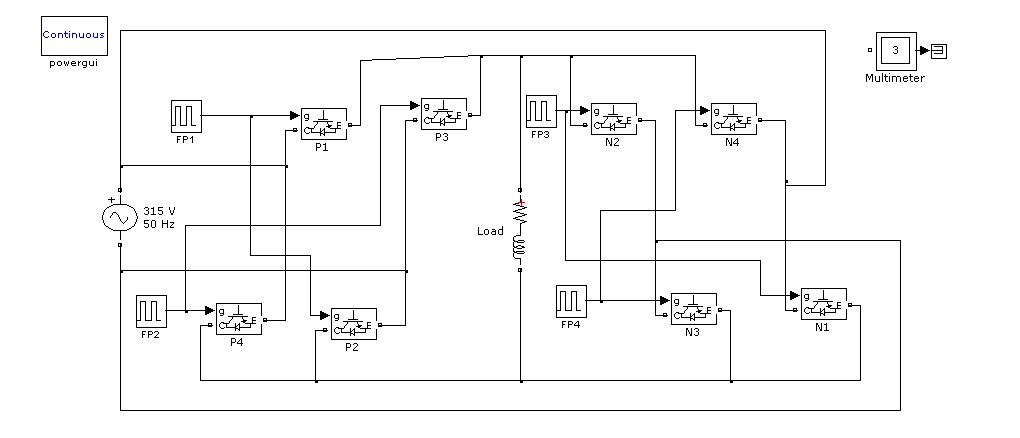
Single phase cycloconverter with RL load


Matlab based engineering projects

Consultancy* on MATLAB based projects in the following fields:

1.   Power system faults, power quality, power controllers, power factor, hvdcc lines, transmission and distribution systems, active passive filters etc.

2.   Power controllers, inverters, choppers, rectifiers, cycloconverters, matrix converter, dc drives, ac drives.


3.   Electrical machines, dc series, shunt and compound motor, induction motor V/F control, synchronous motor control.

4.   Renewable energy sources, wind power, solar power, biogas, solar chimney, solar pond design, fuel cell modeling projects.


5.   Artificial neural networks, fuzzy logic controllers, control system, communication networks, wireless sensor network.


Email: tyagiagam@gmail.com , M: 9457471732


*Charges are based on the nature of work required 

Friday, 2 August 2013

Parallel operation of chopper Simulink model


This model simulates the parallel operation of a boost converter. The results of simulations can be analysed in the next figure

Thursday, 1 August 2013

Want proficiency in Matlab? MATLAB/SIMULINK expertise course for Engineeers, Dehradun

MATLAB/SIMULINK Course structure
Complete course on MATLAB
Duration: 56 Hrs or 6 weeks (1.5 month)
Coverage: Session 1 to 8
Fees: Rs 12,000/-
 Contact: 9557069448, Email: tyagiagam@gmail.com 
Session #
Title of session
Brief Description
Expected Duration (hrs)
Sess.-1
An overview of MATLAB
This session devoted to MATLAB basics like various types of windows, symbols, commonly used commands, various Formats available, mediocre arithmetic operations along with their operations, engineering programming approach with programs and simple programming exercises follows.  
6(4 for illustrations & 2 for discussions with students)
Sess.- 1.1
Intro to MATLAB programming
Review of session 1 with few more illustrations and exercises so as to build up a robust foundation for a naïve programmer along with a practice session of 4-6 hrs
3 to 4 depending on the understanding of the students and a practice session of 4-6 hrs
Sess.- 2
Fundamentals of MATLAB programming
In this session fundamentals required for programming like variables, useful commands, arrays & their syntax matrices, arithmetic operations, relational operators, logical operators & operator precedence will be demonstrated.
Further we will discuss about MATLAB graphics (2D & 3D plots), Branching & looping functions, Input & Output functions along with detailed programming problems. This session is again followed by a practice session & illustrations so as to make a good foundation for coding.
8 (4 for discussions and illustrations & 4 for programming exercises)
Sess.- 3
Numeric cells & Structured Arrays
This session deals with Vectors, creating Arrays & Matrices, array addressing, multi-dimensional arrays, array operations, special Matrices, polynomials, structure functions & illustrative examples
4
Sess. 4
Programming structure
In this session algorithms & control structures, structured programming, step for developing a computer solution, Documenting with charts, flow chart representation for various statements, pseudo codes, finding bugs, operators, strings and conditional statements are discussed.
4
Sess. 5
Fundamentals of Simulink
This session is devoted to fundamentals of Simulink and covers: Introduction to Simulink, frequently used blocks, Configuration parameters, various blocks and their description, power system simulation blockset and simulation projects.
6 (4 for discussion and 2 for illustration)
Sess. 6
Applications of Basic Electrical Engineering
Elementary definitions, Basic waveforms, average, rms & peak values, Ohm’s law, KCL, KVL, Dependant sources, Series/parallel circuits, Superposition, Reciprocity, Thevenin’s, Maximum power transfer theorems, Types of powers and Simulation projects
6
Sess. 7
Simulation of Rectifiers
This session deals with power electronic Rectifiers. It contains introduction, performance parameters, controlled & uncontrolled switches, different types of rectifiers with various loads and their analysis and Simulation projects.
6
Sess. 8
Review & brainstorming
This review and brainstorming session for setting up the things learned by you so far. One or two projects might be discussed.
2


Want to learn MATLAB? MATLAB elementary learning course, Dehradun

MATLAB/SIMULINK short Course structure

Course 1: Elementary course on MATLAB
Duration: 36 Hrs or 4 weeks (1 month)
Coverage through following session
Fees: Rs 5000/-
contact: 9557069448 


Session #
Title of session
Brief Description
Expected Duration (hrs)
Session-1
An overview of MATLAB
This session devoted to MATLAB basics like various types of Matlab windows, predefined symbols, commonly used commands, various display formats available, mediocre arithmetic operations and their demonstrations, operator precedence, managing work session, polynomial roots, simple plot, solving linear algebraic equation, writing MATLAB programs and simple programming exercises follows.  
6(4 for illustrations & 2 for discussions with students)
Session-2
Intro to MATLAB programming
Review of session 1 with few more illustrations, general purpose commands, predefined symbols, Into to SIMULINK and programming problems so as to build up a robust foundation for a naïve programmer along with a practice session of 4-6 hrs
3 to 4 depending on the understanding of the students and a practice session of 4-6 hrs
Session-3
Fundamentals of MATLAB programming
In this session fundamentals required for programming like variables, useful commands, arrays & their syntax matrices, arithmetic operations, relational operators, logical operators & operator precedence will be demonstrated.
Further we will discuss about MATLAB graphics (2D & 3D plots), Branching & looping functions, Input & Output functions along with detailed programming problems. This session is again followed by a practice session & illustrations so as to make a good foundation for coding.
8 (4 for discussions and illustrations & 4 for programming exercises)
Session-4
Numeric cells & Structured Arrays
This session deals with Vectors, creating Arrays & Matrices, array addressing, multi-dimensional arrays, array operations, special Matrices, polynomials, structure functions & illustrative examples
4


Monday, 6 May 2013

Does This Energy Storage System Have Potential? ENGINEERING.com

Does This Energy Storage System Have Potential? ENGINEERING.com

t’s not a new concept: When a wind turbine or solar array generates more energy than you’re using, the excess energy can be stored by pumping water into an elevated holding tank, converting kinetic energy into potential energy. When energy is needed, the water flows down and spins a turbine that generates electricity.
Engineers at MIT are proposing a similar system for off-shore wind turbines, but instead of an elevated holding tank, the water would be stored in a 25 meter concrete spherical tank that also anchors the floating turbine to the ocean floor. The sphere is placed at a depth of 400 meters. Excess electrical energy pumps water out of the tank and into the ocean, and when energy is needed the water flows back into the sphere and drives a hydroelectric generator.